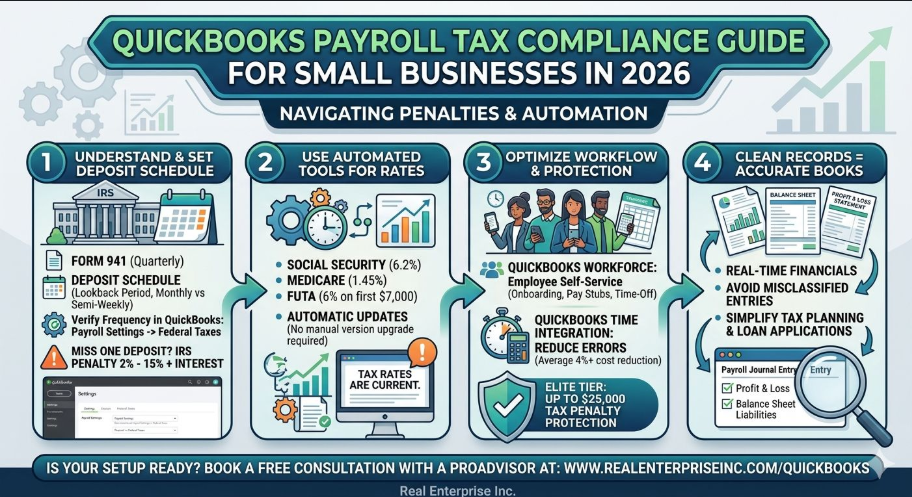
A single missed payroll tax deposit can trigger an IRS failure-to-deposit penalty of 2% to 15% — and that's before any interest accrues. For a small business running payroll even once a month, that kind of hit is avoidable. QuickBooks Payroll has the tools to keep you on the right side of the IRS, but only if you're using them correctly.
Most small business owners set up payroll once and assume it runs itself. That's where things go sideways. Federal payroll tax rules require you to file Form 941 each quarter to report wages, tips, and withheld taxes — and your deposit schedule (monthly vs. semi-weekly) is determined by your lookback period, not your preference. If your QuickBooks payroll settings don't reflect your correct deposit schedule, you can be filing accurately and still paying penalties because the timing is off.
Start by confirming your federal tax deposit schedule inside QuickBooks Payroll settings. Go to Payroll Settings → Federal Taxes and verify your deposit frequency matches what the IRS assigned you. QuickBooks will automate the reminders and payment routing once that's correct — but it can't fix bad inputs. Also worth noting: as of 2026, Intuit has shifted to rolling monthly tax table updates, which means your rates for Social Security (6.2%), Medicare (1.45%), and FUTA (6% on first $7,000) stay current automatically without requiring a manual version upgrade.
For businesses with employees, QuickBooks Workforce is worth activating if you haven't already. The platform handles new hire onboarding, time-off requests, and timesheet syncing — all of which feed directly into payroll calculations. If you're on the Workforce Elite tier, you also get tax penalty protection up to $25,000, which functions as a backstop if an error slips through. That feature alone can justify the cost for any business running payroll for five or more employees. Connect QuickBooks Time to your payroll workflow and Intuit reports an average payroll cost reduction of over 4% — simply from reducing manual entry errors.
Clean payroll records don't just protect you from the IRS — they're the foundation of accurate financial statements. Every payroll run touches your profit and loss, your balance sheet (through payroll liabilities), and your cash flow. If your payroll journal entries are misclassified — say, employer taxes are being booked to the wrong expense account — your financial reports are quietly misleading you every month. That makes tax planning harder, loan applications messier, and year-end reconciliation a nightmare. Getting payroll right in QuickBooks means your books are telling you the truth in real time.
If your QuickBooks payroll setup hasn't been reviewed recently, or you're not confident your deposit schedule, tax mapping, and quarterly filings are aligned, it's worth a second set of eyes. A certified QuickBooks ProAdvisor can walk through your setup, catch misclassifications, and make sure you're not leaving money on the table or walking into penalties. You can book a free consultation at https://www.realenterpriseinc.com/quickbooks — no obligation, just a clear picture of where your payroll compliance stands.
Sources
- Payroll Services for Small Businesses | QuickBooks
- QuickBooks Desktop 2026: What You Need to Know | Paygration
- Intuit Unveils QuickBooks Workforce | Intuit Inc.
- What Is Payroll Tax? A Complete Guide for Small Businesses (2026)
- Payroll Professionals Tax Center | IRS
- Kiplinger Tax Topics: A Small Business Owner's 2026 Planning Checklist